Lookout Mobile Security

  • Subscribe to our RSS feed.
  • Twitter
  • StumbleUpon
  • Reddit
  • Facebook
  • Digg
Showing posts with label cartoon making tools. Show all posts

Thursday, 19 January 2012

Free tools to create comic strips

Posted on 19:41 by Unknown
Creating cartoons and comic strips for educational uses can be quite  interesting task. It obviously pushes the reluctant students to participate more and rub  the dust off their brains. Students love to work in groups and compete with each other especially when there are motivating incentives for them. One of these incentives is the integration of comic strips into parts of your lesson.


Thanks to web 2.0 technologies , educators and teachers will never run short of new innovative ideas. There are a bunch of free to use technologies that can be used with our students to create an educationaly healthy environment full of both fun and learning. After the success of the article Free Tools to Turn Pictures into Cartoons,  today I am sharing with you another article which is a  list of some awesome comic strip making tools that you can use for free with your students in the classroom. Every tool has been covered in separate post, just click on any title to be directed to its tutorial.

1- Witty Comics

Witty Comics is a cool website. It allows its users to create two characters dialogues. This is a great learning tool for students


 2- Pixton

Pixton is a cartoon creation tool that allows its users to create awesome comics. Pixton has also a growing community that anyone can access to contribute with their own comics.

3- Make Belief

Make Beliefs is another awesome comic strip creation tool. It resembles Pixton for they both provide their users with a variety of tools to edit and generate their cartoons.

4- Chogger

 Choggers has a good editing tool that allows users to create their own cartoons out of imported photos. Users can even hook on their camera and snap images to edit on Chogger. 

5- Cartoon for The Classroom

Cartoon for the Classroom is a great resource of comic strips for educators and teachers. This is a website created by the Association of American Editorial Cartoonists ( AAEC ). It provides a variety of lesson plans based on cartoons created by the members of AAEC

6- Anmish

Anmish is a fun web application. It allows its users to create funny animations using caricatures of political figures.

7- A List of  Free Tools to Turn Pictures into Cartoons

Here are ten useful and free web tools that enable you to turn pictures and photos into cartoons and share them with others.
Read More
Posted in cartoon making tools | No comments

Witty Comics A Learning Cartoon Tool

Posted on 05:56 by Unknown
Witty Comics is a cool website. It allows its users to create two characters dialogues. This is a great learning tool for students. They love cartoons and comics and are much more inclined to learn via dialogues and interactive  play roles. Teachers can use Witty Comics to create dialogues underlining the target structures they want to teach  and let students act them out. Students can on their part use Witty Comics to create thier own  dialogues and rehearse them in front of their peers. Witty Comics is a good tool to foster students communicative skills and enhance their creative powers.


Witty Comics is free of charge and is very easy to use. It has a simple platform that any one can handle , the only thing you need to do is to register with them and start making comics straight away. Pre-drawn background scenes and characters are already provided and students will only select the ones they want to feature in their comics.
Read More
Posted in cartoon making tools | No comments

Wednesday, 18 January 2012

Make Beliefs Easily Create Comic Strips and Share Them with Others

Posted on 16:53 by Unknown
Make Beliefs is another awesome comic strip creation tool. It resembles Pixton for they both provide their users with a variety of tools to edit and generate their cartoons. Make Beliefs provides a set of features that are completely free . Students would love to work a platform such as Make Beliefs'. This will encourage them to collaborate with each other in writing, drawing and colouring. Their creative powers will also be fostered and a healthy learning environment can be created out of a good use of these comic strip tools.


Some features of Make Beliefs

Here is a set of features that Make Beliefs offers to its users:


  • It is free
  • It is easy and simple to use
  • It has a user friendly interface
  • It supports several languages including English, French, German, Italian, Portugues and  Latin
  • It provides pre drawn characters and dialogue boxes
  • Users  have a huge flexibility when editing their strips
  • They can change the size of each character or dialogue bubble, bring elements forward within each box or even change the sequence of each box
  • It offers some writing prompts

Users can email their strips or print them off


Head over to Make Beliefs to learn more
Read More
Posted in cartoon making tools | No comments

Turn your picture into Cartoon Using Choggers

Posted on 15:16 by Unknown
Chogger is an awesome comic strip building platform. It looks like Pixton and Make Beliefs  but offers extra services. Choggers has a good editing tool that allows users to create their own cartoons out of imported photos. Users can even hook on their camera and snap images to edit on Chogger. There are also tools to help users start  drawing their own  images  from scratch. It is indeed so much fun working on Chogger and students will definitely feel at ease using it.


Some features of Chogger

Here is a list of the main features that choggger offers to its users


  • It is free
  • It is easy and simply to use
  • It has a user friendly interface
  • It lets users create their own strips 
  • Users can either draw their images, import them or use their cameras to take some
  • It allows users to add different effect to their images such fading and outlining
  • It offers frames and lets users customize the look of their frames
  • It requires a sign up
  • Users can read comics made by others


Head over to Chogger and give it a try
Read More
Posted in cartoon making tools | No comments

Cartoon for The Classroom A Free Resource of Downloadable Cartoon Lesson Plans

Posted on 12:00 by Unknown
Cartoon for the Classroom is a great resource of comic strips for educators and teachers. This is a website created by the Association of American Editorial Cartoonists ( AAEC ). It provides a variety of lesson plans based on cartoons created by the members of AAEC. These lesson plans cover different topics ranging from politics to economy and society. Any teacher can access these materials and download them in the form of PDF.


Cartoons for the Classroom is running now a contest for students . The contest started on the 16th of January and will end in the 30th of this same month. Students in all over the United States are asked to provide their own captions to win a book. 27 captions have been submitted until now.


Head over to Cartoons for The Classroom to explore more.
Read More
Posted in cartoon making tools | No comments

Pixton A Great Cartoon and Comic Strip Making Tool

Posted on 09:20 by Unknown
Pixton is a cartoon creation tool that allows its users to create awesome comics. Pixton has also a growing community that anyone can access to contribute with their own comics. This tool is very easy to use and does not require any artistic skills to work on it. You can introduce it to your students and let them create their own comics and share it with each other.


Besides the free individual accounts, Pixton offers a service designed specifically for schools called Pixton for Schools which is not free. This service enables teachers to create private rooms for their students in which they can collaboratively create and share their comics.


Some features of Pixton

Here is a list of the main features that Pixton provides for its users:


  • It is free for individual accounts
  • It lets users create their own comics
  • It lets you give text and speech bubbles to characters
  • It lets you edit the shape and position of each comic panel
  • It offers unlimited range of expressions
  • It lets you upload your own photos and personalize them the way you want
  • It provides presets, templates, and shapes.


Watch this video to learn more about Pixton
Read More
Posted in cartoon making tools | No comments

Wednesday, 3 August 2011

A List of some of the best Cartoon Making Tools

Posted on 16:19 by Unknown
The following are some of the best Cartoon Making tools. Due to the growing readers of these tools i finally decided to gather them together for you in a neat and accessible single page so that you can get back to them anytime you want. Educators might use these tools to create caricatures and cartoonic pictures to share with their students in the classroom. I know how important visual aids are in education and applications such as the ones mentioned down are just what we really need to spice up our learning and teaching. Feel free to bookmark and share the list with your friends and colleagues:
1- Cartoonizer

1        
Cartoonizer is acool web application . It allows its users to create funny cartoon version of their cats in seconds

2- Automatoon

2
Automatoon is a great web application. It allows its users to easily create animations. These animations can be reused anywhere on the web.
3- Cartoonatic

3

Cartoonatic is a great mobile app. It allows its users to turn their videos into cartoons using different cartoonish effects.
4- Anmish

4

Anmish is a fun web application. It allows its users to create funny animations using caricatures of political figures

5- Host-d.oddcast

5

Host-d.oddcast is a great image editing tool . It allows its users to embed their pictures and cartonize them into 3d avatar .

6- Write Comics
 6


Write Comics is a good web2.0 tool for creating comics . It resembles Strip Generator , the tool I have covered before in a poste entitled  Strip Generator the easiest way to create comic strips .

7- Convert to Cartoon
 7


Convert to Cartoon is a cool website to use with your students .

8- Toonlet

8
Toonlet is another strip generator tool that we can use in education .

9-  Strip Generator

9

Strip Generator is a great web2.0 site in education . It lets you create your own comic strips with such an ease that anyone with a little technology knowledge would do it in a couple of minutes .
Here are some articles that you might also like to read


Here is a slideshow i have created containing all of the tools mentioned here:


  • A List of Some of The Best Twitter Tools and Apps | Educational ...

  • The Best Free Documentary Websites | Educational Technology and ...

  • The best converting and writing tools | Educational Technology and ...

  • Four free apps to find lyrics on your iPad and iPhone ...

Read More
Posted in cartoon making tools | No comments

Saturday, 30 July 2011

Cartoonizer – cartonize your cat

Posted on 14:13 by Unknown

Cartoonizer is acool web application . It allows its users to create funny cartoon version of their cats in seconds. What i like about this tool is the fact that it enables students and especially younger ones to be creative and expand their way of perceiving the surrounding things around them including pets.

image


Cartoonizer is very easy to use. You just need to choose from 9  different parts including the body, head, tail, eyes, ears, mouth, pupils, and whiskers. There are also various marking to apply to your cartoon such as stripes and shading.


image


Once you finish working on your cat you can then customize  and save it and get back to it to edit it anytime you want using the provided key. When you get the final version of your cartonized  cat you can then print it out or export it.


If you want to explore other cartoon tools then i invite you to check The Best Free Cartoon Making Tools.

Read More
Posted in cartoon making tools, educational web tools | No comments

Saturday, 23 July 2011

Automatoon – easily create free and simple animations

Posted on 08:30 by Unknown

Automatoon is a great web application. It allows its users to easily create animations. These animations can be reused anywhere on the web. I know the first thing that you would think about now is how hard it is to create an animated clip , but do not worry no one of us is a technology wizard yet we can make simple animations to share with our students using Automatoon.


image


Some features of Automatoon

Here is a list of the main features that Automatoon offers to its users:

  • It is free
  • It has a user friendly interface
  • It is easy and simple to use
  • It does not require any sign up or installation
  • It is completely web-based and free
  • It supports iPhones, iPads, Android devices, and all common web browsers.
  • You can also easily export your animations and embed them in your own websites

How can i get started using Automatoon ?

Here is a short video tutorial to sow you how to use Automatoon


Read More
Posted in cartoon making tools, educational web tools | No comments

Tuesday, 5 July 2011

cartoonatic - cartonize your videos easily

Posted on 12:45 by Unknown
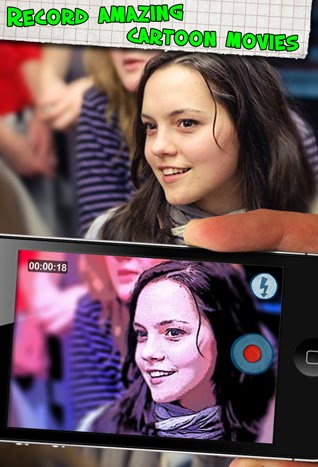
Cartoonatic is a great mobile app. It allows its users to turn their videos into cartoons using different cartoonish effects. If you have iPhone, iPad, or iPod touch then it is time to have some fun. Cartoonatic gives video recording a different touch and if all the videos are configured with the right preset then you can turn them into cartoons right away even while you are recording live.


Some features of Cartoonatic

Here is a list of the main features that Cartoonatic offers to its users
  • It is free

  • It is simple to sue

  • It is easy and quick

  • It offers intuitive navigation

  • It allows its uses to turn their videos into cartoons

  • It offers 9 cool video effects created by cartoon artists

  • It also offers real time preview of all these effects

  • It lets you add music and create animated masterpieces out of your videos

  • You can use the speeding up option to turn your videos into a real fun

  • Instantly share via YouTube, Facebook, Twitter or E-mail


How can i get started using Cartoonatic ?

It is very easy to use and does not need any download or software installation. Juts head over to Cartoonic page and install the app . Once installed you can then start taking videos and applying cartoonish effects very easily. There are more than 9 video effects to choose from. All these effects can be previewed in real-time. Once you are ready to shoot just point it to the subject and tap the record button. You can then add some music to it and share it using the social websites like Youtube, Facebook, or Twitter.
Here is a video tutorial to show you how Cartoonatic turns videos into cartoons
That’s it about Cartoonatic – Cartonize your videos easily.
Read More
Posted in cartoon making tools, educational mobile apps, iPhone/iPad/iPod apps, photo tools | No comments

Anmish – create funny caricatures

Posted on 12:44 by Unknown
Anmish is a fun web application. It allows its users to create funny animations using caricatures of political figures. There are plenty of websites that offer such free services but most of them would entail you to create your own characters before you can start animating their actions and speech. Anmish is different in the sense that it provides ready made caricatures of famous political figures and it is up to you to create out of them your own animation.


Some features of Anmish

Here is a list of the main features that Anmish offers to its users:
  • It is free

  • It is easy and simple

  • It has intuitive interface

  • It requires a free  sign-up

  • It lets you create animations out of popular political figures

  • You can also use a character from a few of the cartoon puppet characters the site lets you select.

  • It lets you morph voice to suit the character you have selected

  • It has up to 3 camera positions or  animation shots

  • Animations are made public for anyone to see


How can i get started using Anmish ?

As i said before Anmish is very easy to use. Just head over to its main page and sign up for a free account.
Now that you are signed in select your character then record your voice  and have it morphed for comic effects. While you are editing your speech , you can choose the proximity of the camera from the character thus giving you three different animation shots. You can switch between these positions very easily and freely giving the video a cool sense of humor.

Applications of Anmish in education

Anmish can be a very useful tool for educators. If you want to bring some fun mixed with learning to your students and break the monotony of every day teaching then think about some funny situations of a public figure you and your students know and make out of it a funny animation and share it with your students. You can also divide them into groups and assign them popular figures and let them come up with the appropriate speech for each character. It is really so much fun and students will love it too.
Read More
Posted in cartoon making tools, educational web tools | No comments
Older Posts Home
Subscribe to: Posts (Atom)

Popular Posts

  • FreezePage: Freeze pages for later use
    FreezePage is a great web tool. It is a sort of bookmarking tool that is completely different from all the other bookmarking tools we hav...
  • mahoganygirl
    mahoganygirl
  • Android Trojan – Learn how to secure your Android
    I have just read an article written by Adrian Kingsley Hughes in ZDNET talking about an Android Trojan. Honestly speaking , i never though...
  • iTalk Recorder : A Free Audio Recording Mobile App
    iTalk Recorder is one of the top downloaded app for Ipad and iPhone . iTalk Recorder allows its users to record audio and save it into th...
  • Idea sketch
    Idea Sketch is a great mobile app for educators. It allows its users to easily “ draw a diagram , mind map, or flowchart and convert it to ...
  • Documentary Heaven Free Documentaries for Educators
    Documentary Heaven is a free website that provides free documentaries. It has a wide library that contains up to 2100 videos and will soon h...
  • Google maps 5.5 for Android: explore the world in 3D
    Google Maps 5.5 for Android has finally been released. It is a cool mobile app which adds up more features to mobile Google maps app that...
  • StoryLine Kids' Audio Stories Read Out Loud
    StoryLine is a great website that reads out stories out loud for kids and beginners.It is one of my favourite  story telling websites . It i...
  • Read It Later –save pages to read offline on your mobile
    Read It Later is another cool mobile app. It allows its users to save web pages to read later even without internet connection. I have alre...
  • DifferenceBetween Find out Differences for Seemingly Similar Terms
    What is the difference between ROM and RAM  ?   is flu different from cold  ?  is Pilate the same as Yoga ?  The common thing between all th...

Categories

  • 21s century education
  • 21st century teaching skills
  • android apps
  • audio conversion tools
  • audio tools
  • avatar creation tools
  • bookmarking tools
  • bp oil spill
  • cartoon making tools
  • Chrome extensions
  • cloud security
  • collaborative tools
  • creative tools
  • documentary websites
  • educational games
  • educational google tools
  • educational mobile apps
  • educational mobile games
  • educational music tools
  • educational search engines
  • educational web tools
  • Electrical network
  • email tips
  • facebook tips
  • file conversion tools
  • file search engines
  • file sharing tools
  • free ebooks
  • free google tools
  • free graphic organizers
  • free mobile apps
  • free presentation tools
  • google mobile apps
  • google search tips
  • google tutorials
  • image conversion tools
  • image editing tools
  • inforgraphic
  • internet safety tools
  • iPad apps
  • iPhone/iPad/iPod apps
  • learn english websites
  • learning tools
  • linear actuators
  • mobile apps
  • mobile audio apps
  • mobile brainstorming apps
  • mobile learning apps
  • mobile note taking apps
  • mobile notetaking apps
  • mobile social networking apps
  • mobile storytelling apps
  • mobile task management apps
  • mobile video apps
  • mobilelearning
  • most popular content
  • music apps
  • music websites
  • notetaking tools
  • organizing tools
  • PDF tools
  • photo tools
  • plagiarism checker
  • PLN
  • publishing tools
  • quiz tools
  • resume tools
  • San Diego data center
  • search tools
  • sharing tools
  • SnowPad
  • social networking tools
  • storage tools
  • teacher resources
  • tutorials
  • Twitter tools
  • VGA over Cat5
  • video resources
  • video tools
  • Vulnerability Management
  • week in review
  • word clouds tools; free graphic organizers
  • writing tools
  • youtube tools

Blog Archive

  • ▼  2012 (199)
    • ▼  June (7)
      • Simple Mathematcal Pattern Describes Shape of Neur...
      • 'Facebook for Animals' Tested On Wild Great Tits
      • Popular Fly Fishing Rods
      • What Does an Electronic Component’s Name Means?
      • What to Expect in Spyware Removal
      • movie poster templates
      • The Benefits of IT Consumerization
    • ►  April (1)
    • ►  March (6)
    • ►  February (83)
    • ►  January (102)
  • ►  2011 (301)
    • ►  December (33)
    • ►  November (21)
    • ►  October (10)
    • ►  September (13)
    • ►  August (41)
    • ►  July (122)
    • ►  June (55)
    • ►  May (6)
Powered by Blogger.

About Me

Unknown
View my complete profile