Lookout Mobile Security

  • Subscribe to our RSS feed.
  • Twitter
  • StumbleUpon
  • Reddit
  • Facebook
  • Digg
Showing posts with label photo tools. Show all posts

Sunday, 12 February 2012

FreePhoto Educational Resource of Photos for Teachers and Students

Posted on 13:39 by Unknown
FreePhoto is a website that provides a large collections of images developed by Ian Britton. It has over 132516 images with 182 sections organized into 3639 categories. Some of the photos in this website are free and others are under a licensing fee.
Students can use this library to look for photos to include in their project works provided that they adhere to the Student Use Guidelines. FreePhoto allows its users to look for photos using either the galleries or keywords. Galleries have images organized under several headings such as the location where the photo was taken, Subject ( sunset, season ) and many more.


freephoto


"Also non-commercial users may download our web size images to use off-line in school projects, church services, cards, leaflets, etc. Basically if your off-line use is not commercial you can download our web size images for free."
Head over to FreePhoto and give it a try.


Read More
Posted in photo tools | No comments

Monday, 9 January 2012

Photopin Great Resource for Free and Licensed Photos

Posted on 16:56 by Unknown
Photo pin is a website that offers Creative Commons Licensed images. This is in a fact a great phoro resource for teachers  and educators. They can use it to post photos to their classroom blogs , make presentations and sldeshows and create video productions.


Photo pin is easy to use. It has a search box where you can type in your topic and preview the image before you can finally download it. The thing about photos downloaded in Photo pin is that they always have a credit link back  to the photo owner. We should teach our students how to  respect copyrights and give back credit when using someone else' production.

"PhotoPin uses the Flickr API and searches creative commons photos to use for your blog. (Note: we are not associated with Flickr in any way, other than powering our search results using their API.)"


 Head over to Photo pin and explore more features.

Read More
Posted in photo tools | No comments

Tuesday, 22 November 2011

A List of some of The Best Free Tools to Create Animated Pictures

Posted on 09:51 by Unknown
Have you ever wondered how to create an animated picture ? If you have here is an answer for you. There are several online  tools  that allow users to create GIF animations from pictures stored on their computers. Here are some of the best free web tools that can help you create animated GIFs

1- Picasion


Picasion is web application that allows its users to :


  • Create GIF animations
  • Control the speed of animations
  • Select the size of the GIFs


2- GifUp


GifUp is another web tool that lets users create animated GIFs and avatars. It is easy to use and has several features such as :


  • Upload images from pc, webcam,Flickr, or grab  them directly from a web page
  • Use as many images as you want to compose your animations
  • Control animation speed settings
  • Download and save animations to your website
  • Share your GIFs with others or embed them in your website or blog


3- GIFMake


GIFMake  is a simple online GIF maker program that lets its users compose their animated GIFs from regular static images. It offers several features such as :


  • You can upload images from your computer or a web address
  • Specify the duration of each frame in the animation
  • Control how many times to repeat each animation
  • download and save animations 


4- MakeAGIF


MakeAGIF is a great image maker that allows users to  created animated GIFs out of images of different sizes and formats. Among its features ;


  • No registration is need
  • No software to download is required
  • Upload images up to 1MB in size
  • it has several animation options to apply to your images


5- Gickr


Gickr is a free animated GIFs maker. The tool is very easy to use and has several features such as :


  •     Make free animated GIFs
  •     Upload images from a web address , or computer
  •    You can use up to 10 picture in an animation
  •    It is free and does not require any registration
  •   It generates a link for you to share your animations with others


6- GifSoup


GifSoup is a free video to GIF converter. It allows its users to :

  •  Convert Youtube videos into animated GIFs very easily and with just few clicks
  •  Download animated GIFs into your computer
  • It offers a ten second limit on video lenght
  • It has a wide library of animated GIFs created by others

I hope you liked the tools. If you have any additions to the list share it with us below.
Read More
Posted in photo tools | No comments

Friday, 11 November 2011

Black-Text Turn Pictures into Text Images

Posted on 12:23 by Unknown
Black-Text is a cool photo editing application. It allows its users to turn any image into a readable text-laden photo within seconds. I am adding this tool to the list I have been compiling here about the Best Free Photo Editing Tools. The reason why my posts often cover photo editing tool here is to give educators the chance to discover great ways they can innovatively use pictures in their classrooms. We all know the importance of visual media in education and to go online and start googling for such tools  would take you some time, That is why this blog and many other ones out there on the net , are trying to aggregate the best free tools and deliver them in a ready to take posts.


Black-Text is free and has a handy editing board where you can carry out many actions like changing the style, colour, text fonts and many more.


How can I get started using Black-Text ?

Just head over to Black-Text main page and upload a photo you want to convert and then enter the text you want to go with it. This text can be just a few sentences , quotes or even long paragraph. Black-Text then turns your image into a desaturated image with your text placed on it. Users can also resize image size, font type, text colour and background colour. When done with the customization then you can either save the image or print it.
Read More
Posted in photo tools | No comments

A List of Some of The Best Photo Editing Tools

Posted on 09:59 by Unknown
Photos and images are great multimedia tools to incorporate into your classroom teaching. Students attention and  curiosity are easily arisen when graphic content is involved. So to help you prepare teaching visual aids to include in your classroom, Here is a set of useful and free photo editing tools that you can use very easily. With these tools you can add your personal touch to your photos and make them even more engaging. Click on any link to read more about the photo editing tool .


Convert to Cartoon: editing This is a great photo editing tool that allows its users to turn their photos into cartoons.

Anmish : This tools allows its users to add funny effects to their photos.

Picnik  : This is a great photo editing tool. It allows its users to apply several awesome effects on their images using a wide range of editing tools.

GrossOut : This photo editing tool allows its users to add  heinous and scary effects such as “crazy eyes, gnawing teeth, eye patches, bat wings, bloody knives and axes, open gash and wounds, masks, and many many more.”

YourOldPic : It  is a great image editing tool. It allows its users to make their pictures look old.


Image Embellisher :   It allows its users to quickly and easily add special effects to their images.

RoundPic : It allows its users to edit their images and turn them into rounded pictures.

Pixlr-o-matic is one of the easiest tools to help you add that personal touch without being a techno geek.

iPiccy : offers a plethora of editing functions that you can use very easily .


Zoom.it:  It allows its users to view and share high resolution imagery.

Bubblesnaps :  is about adding speech bubbles to a picture.

Visualize.us :  It lets you bookmark all your favourite pictures from different websites and share them with your anyone .

PictureTrail: It offers easy ways to organize your pictures and share them with your family , friends or student .

Subit :  It lets you add explanations to your images or create a personalized slideshow.

Image to Video : This tools  allows you to convert jpg images to videos .

Host-d-oddcast : It is a great image editing tool . It allows its users to embed their pictures and cartonize them into 3d avatar .

Black-Text : It  is a cool photo editing application. It allows its users to turn any image into a readable text-laden photo within seconds.

If you have other suggestions that we can add to this list then feel free to share with us in the comment box below.
Read More
Posted in photo tools | No comments

Wednesday, 3 August 2011

Picnik – awesome photo editing tool

Posted on 10:42 by Unknown
Picnik is a great photo editing tool. It allows its users to apply several awesome effects on their images using a wide range of editing tools. “ It’s fast, easy, and offers tons of powerful tools, artistic effects, stickers, frames, touch-ups, scrapbooking tools and more. And that’s all for free.”
Picnik is one of the best photo editing tools online. It has two versions: one is free and has enough features to let us tweak images the way we want and the other is premium and has extra features, more tools, advanced effects.


I highly recommend this web tool to educators. Just head over to Picnik and open your free account and start tweaking pictures to share with your students in the classroom. If you want to be an advanced Picnik user then here is a detailed guide to walk you through the different steps and tricks behind a full mastery of Picnik details. Read The Complete Guide of How to Perfectly Use Picnik.

Some features of Picnik

Here is a list of the main features that Picnik offers to its users:
  • It is both free and paid
  • It has a user friendly interface
  • It is easy to use
  • It allows users to customize and tweak their images in the ways they want
  • It lest you crop, resize, and rotate in real-time
  • It works on Mac, Windows, and Linux

How can i get started using Picnik ?

Here is a short video tutorial to show you how to use Picnik


If you liked this application and want to discover other similar tools then i advise you to check: Free Photo Editing Tools.
Read More
Posted in image editing tools, photo tools | No comments

Tuesday, 2 August 2011

GrossOut – use scary effects to customize your picture

Posted on 15:41 by Unknown
GrossOut is a cool web application. It is a photo editing tool  that is not like any other  app we have covered here so far. GrossOut enables its users to turn their pictures into gross shots. Before , i used to introduce you to photo tools that only allow you to add embellishing  effects but today you will step into the world of ugly art. You will be adding heinous and scary effects such as “crazy eyes, gnawing teeth, eye patches, bat wings, bloody knives and axes, open gash and wounds, masks, and many many more.”

image

Some features of GrossOut

Here is a list of the main features that GrossOut offers to its users:
  • It is free
  • It is easy to use
  • It does not require any sign up or registration
  • It lets you add scary and heinous effects to your images
  • You can upload your own picture or capture one using your webcam
  • You can also download your scary photo to your computer

grossout

How can i get started using GrossOut ?

It is very simple. Just head over to GrossOut main page and start uploading your image or use your camera to capture one. When the upload is over you will be then directed to the editor where you can have access to several  gross tools to apply on your photo. You can also flip, resize, and rotate each item for maximum effect.
Read More
Posted in image editing tools, photo tools | No comments

YourOldPIC – make your pictures look old

Posted on 09:42 by Unknown
YourOldPic is a great image editing tool. It allows its users to make their pictures look old. In fact this option exists in many other applications but it is not as simple and effective as in this website. You do not need any technological knowledge to do it. It is very simple and in a couple of seconds you will have a  picture that you have taken just this morning looks like one being taken decades ago.

youroldpic


YourOldPic allows you to upload your own pictures . Right after the upload is over, you can then see your picture in the old form. The new customized picture can be easily shared via the networking buttons located under it.

Some features of YourOldPic

Here is a lis of the main features that YourOldPic offers to its users:
  • It is free
  • It is easy to use
  • It has an intuitive interface
  • It allows its users to make their pictures look old
  • You can upload your pictures there
  • You can share them with your friends and everyone else via email
  • You can also bookmark your photo
  • you can use the embeddable code to use the picture in your blog or website

How can i get started using YourOldPIC ?

It is very simple. You just need to head over to YourOldPic main page. Upload your picture and wait for a few seconds then you will be provided with the ‘old’ form of the picture. You can use the networking buttons under it to share it with other people
Read More
Posted in image editing tools, photo tools | No comments

Monday, 1 August 2011

iPiccy – add cartonizing effects to your pictures

Posted on 15:50 by Unknown
iPiccy is another great photo editing web site. It allows its users to add wonderful effects to their images. What is great about this tool is that it does not require any installation or download. Whenever you are connected you can just head over to its main page and start editing right from there.
iPiccy offers a plethora of editing functions that you can use very easily . Among these editing  services are resizing, cropping, rotation, contrast fixing, and equalizing.. You can also use their cartonizing tools to turn your pictures into cartoons, a service which i like the most.


iPiccy lets you upload your own pictures from your computer or  select an image that is stored online. In case you do not have any , you can take one with your webcam or use the paint tools to draw yours.

Some features of iPiccy

Here is  a set of the main features that iPiccy offers to its users:
  • It is free
  • It is easy to use
  • It allows its users to add awesome effects to their pictures
  • You can upload pictures from your pc or URL or simply draw one you like
  • It provides several image editing tools
  • you can share your customized picture with a direct URL.

Applications of iPiccy in education

If you are an educator then i would recommend this tool for you. Use it to create awesome customized pictures to share with your students. If yopu need more photo editing tools that are as easy to work on as this one mentioned here then i invite you to check Free Photo Editing Tools.
Read More
Posted in image editing tools, photo tools | No comments

Pixlr-o-matic – add awesome effects to your images

Posted on 15:28 by Unknown

Pixlr-o-matic is a great photo editing tool. It allows its users to customize their pictures the way they want using very simple tools. we all sometimes want to add a personal touch to the pictures we would like to share with others especially when it comes to using them in the classroom. Pixlr-o-matic is one of the easiest tools to help you add that personal touch without being a techno geek.


Some featres of Pixlr-o-matic

Here is a list of the main features that Pixlr-o-matic offers to its users:
  • It is easy to use
  • It has a user friendly interface
  • It lets you customize your pictures the way you want
  • It allows you to add awesome retro looks to images
  • You can upload images from your pc or webcam
  • No sign up is needed

Applications of Pixlr-o-matic in education

i do recommend this website to educators. They can use it to add amazing effects to the pictures they want to use in the classroom. Students will love to see customized images especially when they arouse their curiosity and interactivity.
If you want to learn more about other great photo editing tools then i invite you to check Free Image Editing Tools.
Read More
Posted in image editing tools, photo tools | No comments

RoundPic – add rounded corners to your images

Posted on 15:10 by Unknown
RoundPic is a cool website. It allows its users to edit their images and turn them into rounded pictures. I know many of you use different photo editing tools but this applications is one of the easiest ones available online. It is very simple and instant and the result is great.
Photos are a very important elements in the teaching and learning operation. We use them almost on a daily basis and having such easy tools at hand can only make your job greater.


Some features of RoundPic

Here is a list of the main features that RoundPic offers to its users:
  • It is free
  • It is easy to use
  • It has an intuitive interface
  • It lets users edit their images
  • It lets you make rounded corners for images
  • It lets you upload a picture from the web or hard drive
  • It supports different formats such as JPEG, .JPG, GIF, .BMP or .PNG.
  • You can save rounded images to your pc
  • It does not require any email or registration

How can i get satrted using RoundPic

It is very simple. Just head over to RoundPic main page . Upload a picture from your pc or from a given URL and click “Round It”. When it is done you can then customize it the way you want. You can for instance customize the look of its corners and its size or change the background color.
If you want to learn more about other great photo editing tools then i invite you to check Free Image Editing Tools.
Read More
Posted in image editing tools, photo tools | No comments

Tuesday, 5 July 2011

cartoonatic - cartonize your videos easily

Posted on 12:45 by Unknown
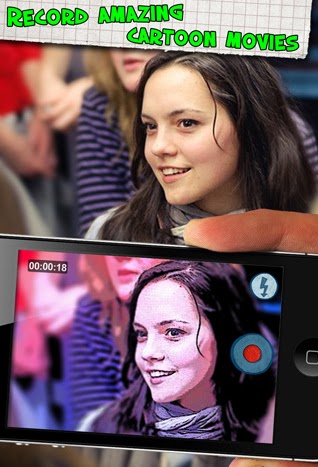
Cartoonatic is a great mobile app. It allows its users to turn their videos into cartoons using different cartoonish effects. If you have iPhone, iPad, or iPod touch then it is time to have some fun. Cartoonatic gives video recording a different touch and if all the videos are configured with the right preset then you can turn them into cartoons right away even while you are recording live.


Some features of Cartoonatic

Here is a list of the main features that Cartoonatic offers to its users
  • It is free

  • It is simple to sue

  • It is easy and quick

  • It offers intuitive navigation

  • It allows its uses to turn their videos into cartoons

  • It offers 9 cool video effects created by cartoon artists

  • It also offers real time preview of all these effects

  • It lets you add music and create animated masterpieces out of your videos

  • You can use the speeding up option to turn your videos into a real fun

  • Instantly share via YouTube, Facebook, Twitter or E-mail


How can i get started using Cartoonatic ?

It is very easy to use and does not need any download or software installation. Juts head over to Cartoonic page and install the app . Once installed you can then start taking videos and applying cartoonish effects very easily. There are more than 9 video effects to choose from. All these effects can be previewed in real-time. Once you are ready to shoot just point it to the subject and tap the record button. You can then add some music to it and share it using the social websites like Youtube, Facebook, or Twitter.
Here is a video tutorial to show you how Cartoonatic turns videos into cartoons
That’s it about Cartoonatic – Cartonize your videos easily.
Read More
Posted in cartoon making tools, educational mobile apps, iPhone/iPad/iPod apps, photo tools | No comments

Sunday, 3 July 2011

nachofoto – real time image search engine

Posted on 07:56 by Unknown
Nachofoto is a real time image search engine. This post is, in fact is, an addition to the series of posts i have covered about educational image search engines. If you haven't had a look at these posts then i invite you to check :
1 Educational Image Search Engine Part 1
In this post i talked about : Google Image Search and Morgue File
2 Educational Image Search Engine Part 2
In this post i have talked about : Wylio and Edupic Graphical Resource.
3 Educational Image Search Engine Part 3
In this post  i have talked about : Yahoo Image Search, The World Images Kiosk, ImageBase, and Photo8.
Today i am presenting to you Nachofoto which is a great image search engine that is designed to bring you the best results from across the web using a sophisticated search algorithm. It covers queries about entities and events such as : celebrities, movies, tv, music artists, sports, politicians, products, the royal wedding, london olympics, japan earthquake.


How can i get started usng Nachofoto ?

Here is a short video tutorial to show you how you can use this cool web application

I invite educators to try this tool inside their classrooms and show their students how to use it . I am quite sure you will find it very beneficial.
Read More
Posted in educational web tools, photo tools, search tools | No comments

Saturday, 2 July 2011

educational Image Search engines part 3

Posted on 14:24 by Unknown
This is the third post in a series of posts designed to help educators find secure links to look for images. After a long search into Creative Commons and Public Domain Images, i come up with a list of the most renowned image search engines that provide free licensed photos. I have already provided some  of these search engines in the first two parts and if you have not already checked those posts then click on any link below to direct you back to those articles :
Educational Image Search Engines part 1 :
In this part i have talked about :
  1. Google Image search

  2. Morgue File

Educational  Image Search Engines Part 2 :
In this part i have covered :
  1. Wylio

  2. Edupic Graphical Resource

and today i will be talking about :
  1. The World Images Kiosk

  2. ImageBase

  3. Photo 8

  4. Yahoo Image Search


The world Images Kiosk


The world Images Kiosk is another image search engine that offers more than 75.000 images that teachers and students in their academic endeavors. This website is hosted by San Jose State University . The World Images includes all areas of visual imagery and it uses simple techniques to browse through its directory. You can for example use Quick Search option to quickly locate a picture or use The Advanced and ADA Searches options to have more features included in your search query.
The images are organized into over 800 portfolios that appear alphabetically in the portfolio list. Use the Browse Collections Tab to explore its database that is hierarchically organized starting with continents and subject groupings.
Remember all the images are licensed under a Creative Commons License which means that you need to give proper attribution when necessary.
ImageBase


ImageBase is another great resource site for teachers and students looking for licensed pictures. ImageBase offers more than one hundred pages of images that can be freely reused and redistributed.
ImageBase is created by a professional photographer named David Niblack to help educators have access to free image resources. This website does not only offer images but also Hundreds of PowerPoints. I highly recommend ImageBase to teachers and students and i would love that you keep it in your mind next time you want to look for an online graphical  resource.
Photo 8


Photos 8 is another resource for teachers and students looking for images that are in the public domain. It offers “free Photos and Wallpapers, Large collection of high resolution stock photos, Thousands of high quality pictures”. There are roughly 24 categories to browse through starting with Animals and ending with Travel.
Photos 8 is created by Sam Mugraby who is a professional photographer. Sam is making his photos available to anyone who wants them for any purpose including commercial. Just make sure you comply with his terms and conditions.
Yahoo Image Search


Like Google Image Search , Yahoo has also another service that allows its users to look for Creative Commons Licensed pictures. Yahoo uses a developed filter to provide the exact results for example you can filter your search to look for just images that are under the Creative Commons License or you can use it to look for images that can be used just for commercial purposes. Head over to Yahoo Image Search and start your experience.
Read More
Posted in educational web tools, photo tools, search tools | No comments

educational image search engines part 2

Posted on 14:09 by Unknown
This is a follow up post to  Educational Image Search Engines Part 1. In the previous post i have talked about issues with copyrighted materials and how to teach your students to respect owners’ copyrights when including their materials in the classroom and have also provided two Image Search Websites that are licensed under creative commons and public domain these are : Google Image Search and Morgue File . Today i will introduce you to two other websites where you can look for images and include them in your work without having to worry about copyright issues.
3 Wylio


Wylio is another image search engine that allows its users to search millions of photos that have been designated as Creative Commons works by their owners/uploaders. What really amazes me about Wylio is the fact that it provides you with an html code to use on your blog or website as an attribution to the creator of the image you are using.
Wylio does not only provide pictures but also help you do some editing and customization to the images you find. You just need to have an account, it is free and easy to use . Once you are registered you will have access to more advanced features that are not provided for passerby users.
Google has ranked Wylio with a page rank of 6 which is definitely  an authority in the topic the website talks about. Wylio is also featured on the most renowned websites like : TechCrunch, Makeuseof, and WebBeat .
If you are a teacher i advise you to keep this website in your mind whenever you are looking for visual stimulants for your students. The images are licensed under creative commons and copyright will not be an issue.

4 EduPic Graphical Resource


Edupic Graphical Resource provides free photographs and graphics for education. It is a teacher designed free image resource for educators and their students. All the images included in this website are free for use by educators and students without permission but any other user has to take permissions because all rights are reserved.
Edupic Graphical Resource is created by Mr. Vann who is already a teacher and an amateur photograph. We really thank him so much for giving us free permission to use his materials.

I like the way Mr. Vann has organized his materials. There is a tab right under the header where you can learn about contributors or browse through several categories of pictures. just hover over the tab named “ photographs” and a subset of categories will be displayed for you to choose from. You can also hover over “ Drawings “ to check the different  fields provided there.
I advise teachers and students to have recourse to this great educational resource and give it time till they get acquainted with it before starting using its materials.
Now head over to Educational Image Search Engines Part 3 to learn about the other Image Search Engines.
Read More
Posted in educational web tools, free google tools, google search tips, photo tools | No comments

Educational Image Search Engines Part 1

Posted on 14:00 by Unknown
Images speak thousands of words. Educators use them on every day basis, students love them and include them in their multimedia projects.Given this growing importance of images in education , the pending questions that we need to urgently answer are : do we know how to safely look for images online ? do we respect copyrights of those images ?
The first thing that comes into our minds when we want to look for an image online is Google Image Search. This is the most reputed  online image directory.It is a great resource for ‘copyrighted’ images and students can use it without the least doubt about its credibility. but that is not it! There are other image search websites that are licensed under Creative Commons. Today i am going to introduce you to a bunch of these sites and show you some of the features they offer.


Remember , we are educators and we need to educate our kids the best way possible. We need to teach them how to respect copyrights of images and other materials they might find online. You should never tolerate any breach of this rule. We want to prepare people who will ,in the future, respect each other and respect others’ copyrights and to do this wisely you need to introduce your students to Creative Commons and Public Domain issues. If you do not know anything about these two keywords then this is your chance to learn , go around online and collect  resources and links and prepare a few paragraphs to share with your students ( if you are busy or lazy to look for links about Creative Commons or Public Domain then contact me here and i will send  them to you ). Remember Giving the copyright holder credit is part of the deal when using a Creative Commons picture.


After this short introduction, here are some of the most famous image search websites that are licensed under creative Commons and Public Domain. You and your students can use any of these links to look for images to include in your classroom without worrying about copyright issues.
1 Google Image Search


I have already covered this topic in two previous posts and so there is no need to regurgitate what i have already said. To learn about Google Image Search and how to use it to look for images you are invited to read :

  1. Google Image Search – Search Info about any Picture

  2. Google Images with Sorting : Search and Find Images Easily

 
2 Morgue File


Morgue File is another website that provides free photos with license to remix. It “contains free high resolution digital stock photographs and reference images for either corporate or public use. The purpose of this site is to provide free image reference material for illustrators, comic book artist, designers, teachers and all creative pursuits”.
Morgue File features a ‘ Classroom ‘ where you can learn the basics of photography and improve your skills. It provides several lessons and tutorials about the art of photography  for free.
Now head over to Educational Image Search Engines Part 2 to learn about the other Image Search Engines.
Read More
Posted in educational web tools, free google tools, google search tips, photo tools | No comments

Monday, 27 June 2011

Imageoid – easily customize images

Posted on 22:33 by Unknown
Imageoid is a free photo customization tool. We all love photo tools and we feel great when we can control what we can see in a picture. Imageoid is a service that enables you to tweak your photo just the way you like it to look. It offers a variety of effects that you can add to your images making them look like they are created by you. I still remember how you loved  interacted with the other photo tool i have already covered here  under the title: Convert to Cartoon ; turn your pictures into cartoons ... . and today i am presenting to you Imageoid hoping that you will like it too.

imageoid

With imageoid , educators can prepare their pictures very easily and customize them so that students will feel the teachers touch in them. It is very simple to use and you do not need to be a technology wizard to do it. All you need is a browser and an internet connection.

How can i get started using Imageoid ?

Head over to Imageoid main page
Upload an image from your computer
select the effects you want to apply to it, it offers twenty two effects
You can combine different effects into one image and if you are not satisfied with the final result then you can simply click on ‘ reset’ to start over again.
You can also resize your image and make it fit in an article or webpage. here is an example of what Imageoid does to pictures:
We have a picture like this
imageoid
Turned to this
imageoid2
or this
imageoid3
or this
imageoid4
If you liked this photo tool and thought it would help you in your multimedia projects for your classroom then do not hesitate to give a try , it might help.
Read More
Posted in educational web tools, photo tools | No comments

Saturday, 18 June 2011

Zoom.it - see all the details of an image

Posted on 10:22 by Unknown
Zoom.it is a great photo tool. It allows its users to view and share high resolution imagery. It creates a display of your images in such a way that you can zoom in, zoom out and scroll around any image to see all its beautiful details and explore the whole image no matter how large it is. Zoom.it uses the Deep Zoom technology to give its users a new way to experience their imagery.


Some features of Zoom.it

here are the main features that Zoom.it provides for its users:
  • It is free
  • It is easy to use
  • It is simple
  • It allows you to display large images in blogs, wikis, and websites
  • It offers zooming and scrolling options
  • Images need to be  hosted online
  • It lets you share your images with other people using a direct link
  • You can also embed your images in blogs and wikis

How can i get started using Zoom.it ?

It is really very easy to handle. Jut head over to Zoom.it main page and paste the URL of the image you want to zoom and hit create.


It will take a few seconds for the application to start and when it is displayed then you can choose from the options available on the dashboard what action to take
If you want to share it click on the link Zoom.it generates for you and send it your friends and colleagues.
That’s it about Zoom.it –-see all the details of an image.
Read More
Posted in educational web tools, image editing tools, photo tools | No comments

Tuesday, 14 June 2011

Smilebox – Mix pictures,videos, and music into slideshows

Posted on 16:18 by Unknown
Smilebox is a cool web tool. It allows its users to easily create eye catching slideshows from pictures. This is indeed one of the easiest yet effective photo tools we can use in education. It is free and very simple to use. What i really like the most about this tool is the ability to add your videos, words, or music to your slides creating out of them an amazing slideshow to share with others.


Some features of Smilebox

Here is what Smilebox has to offer to its users:
  • It is partly free for there is a premium version with more options but for us here we can content ourselves with the free version

  • It is quick, easy to use and simple

  • It is a friendly interface

  • It allows you to create nice slideshows out of your pictures

  • You can add videos, music or just words to your slides

  • It offers more than 1000 customizable designs for any occasion and style

  • You can share your slideshows via facebook, blogger and email

How can i get started using Smilebox ?

Head over to Smilebox main page and sign up for a free account
Watch this tutorial video to learn more about this tool


Applications of Smilebox in education

Smilebox is one of the best picture tools that we can use with our students in classroom. You can use it  to create slideshows of school events or trips students have organized. You can also encourage your students to use it to create their classroom presentations or school projects.
That’s it about Smilebox – Mix pictures, videos, and music into slideshows.
Read More
Posted in educational web tools, photo tools | No comments

Monday, 13 June 2011

Image Embellisher – Easily Apply Special Effects to your Images

Posted on 14:20 by Unknown
Image Embellisher is a great web 2.0 tool . It allows its users to quickly and easily add special effects to their images. This tool is very simple to use and is completely free. I know there are plenty of image editing tools out there but for us in education we always look for the best and simplest ones.


Some features of Image Embellisher

Here are the main features that Image Embellisher offers to its users:
  • It is free
  • It does not require any registration
  • It is simple to use
  • It allows you to apply special effects to images
  • You do not need to install any special software on your computer
  • You can run it on Windows, Linux, Mac and other systems
  • You can download the final version of your image to your computer

How can i get started using Image Embellisher ?

As i said before Image Embellisher is very easy to use and it takes only few clicks to create beautiful images. here is how to do it:
1 Pick the image effect
There are several image effects there for you to pick from


2 select your image
use the browse button , you can customize and resize your image
3 click on submit
a new image will be automatically generated for you.
4 Download
Now after you are done with your image you can download it to your computer.

Applications of Image Embellisher in Education

Image Embellisher is a great tool for educators. They can use it to generate beautiful pictures to include in their multimedia presentations. I love the freedom this tool offers to its readers, invite students to try it and you will see how creative they are in doing amazing staff with Image Embellisher.
That’s it about Image Embellisher – Easily Apply Special Effects to your Images.
Read More
Posted in image editing tools, photo tools | No comments
Older Posts Home
Subscribe to: Comments (Atom)

Popular Posts

  • Human Restore:Free educative documentaries
    Human restore is a a great website for educators. It is a repository of free engaging documentaries featuring different categories. This w...
  • Android Trojan – Learn how to secure your Android
    I have just read an article written by Adrian Kingsley Hughes in ZDNET talking about an Android Trojan. Honestly speaking , i never though...
  • The best Free teacher resources = collection of great websites
    Here is a list of the best free teacher resources. If you are a teacher or an educator then these URLs are just what you would need to bookm...
  • See Algebra in Real Life with Get The Math
    Get The Math is a great website that provides students and teachers with real world mathematical challenges. The website includes Algebra-ba...
  • FreezePage: Freeze pages for later use
    FreezePage is a great web tool. It is a sort of bookmarking tool that is completely different from all the other bookmarking tools we hav...
  • iTalk Recorder : A Free Audio Recording Mobile App
    iTalk Recorder is one of the top downloaded app for Ipad and iPhone . iTalk Recorder allows its users to record audio and save it into th...
  • Documentary Heaven Free Documentaries for Educators
    Documentary Heaven is a free website that provides free documentaries. It has a wide library that contains up to 2100 videos and will soon h...
  • Free PDF Annotating and Managing tools for Organizing your Research.
    As researchers you always try to keep track of your resources and organize your data in the best way possible. Part of the data you might be...
  • What to Expect in Spyware Removal
    When deciding what to buy to how to remove spyware, there are some things you should consider. Those things must make a decision little ...
  • Many Books – free educational ebooks
    Many Books is a great resource of free ebooks for teachers. It has indexed more than 29.000 free ebook in a variety of format and for diffe...

Categories

  • 21s century education
  • 21st century teaching skills
  • android apps
  • audio conversion tools
  • audio tools
  • avatar creation tools
  • bookmarking tools
  • bp oil spill
  • cartoon making tools
  • Chrome extensions
  • cloud security
  • collaborative tools
  • creative tools
  • documentary websites
  • educational games
  • educational google tools
  • educational mobile apps
  • educational mobile games
  • educational music tools
  • educational search engines
  • educational web tools
  • Electrical network
  • email tips
  • facebook tips
  • file conversion tools
  • file search engines
  • file sharing tools
  • free ebooks
  • free google tools
  • free graphic organizers
  • free mobile apps
  • free presentation tools
  • google mobile apps
  • google search tips
  • google tutorials
  • image conversion tools
  • image editing tools
  • inforgraphic
  • internet safety tools
  • iPad apps
  • iPhone/iPad/iPod apps
  • learn english websites
  • learning tools
  • linear actuators
  • mobile apps
  • mobile audio apps
  • mobile brainstorming apps
  • mobile learning apps
  • mobile note taking apps
  • mobile notetaking apps
  • mobile social networking apps
  • mobile storytelling apps
  • mobile task management apps
  • mobile video apps
  • mobilelearning
  • most popular content
  • music apps
  • music websites
  • notetaking tools
  • organizing tools
  • PDF tools
  • photo tools
  • plagiarism checker
  • PLN
  • publishing tools
  • quiz tools
  • resume tools
  • San Diego data center
  • search tools
  • sharing tools
  • SnowPad
  • social networking tools
  • storage tools
  • teacher resources
  • tutorials
  • Twitter tools
  • VGA over Cat5
  • video resources
  • video tools
  • Vulnerability Management
  • week in review
  • word clouds tools; free graphic organizers
  • writing tools
  • youtube tools

Blog Archive

  • ▼  2012 (199)
    • ▼  June (7)
      • Simple Mathematcal Pattern Describes Shape of Neur...
      • 'Facebook for Animals' Tested On Wild Great Tits
      • Popular Fly Fishing Rods
      • What Does an Electronic Component’s Name Means?
      • What to Expect in Spyware Removal
      • movie poster templates
      • The Benefits of IT Consumerization
    • ►  April (1)
    • ►  March (6)
    • ►  February (83)
    • ►  January (102)
  • ►  2011 (301)
    • ►  December (33)
    • ►  November (21)
    • ►  October (10)
    • ►  September (13)
    • ►  August (41)
    • ►  July (122)
    • ►  June (55)
    • ►  May (6)
Powered by Blogger.

About Me

Unknown
View my complete profile