Lookout Mobile Security

  • Subscribe to our RSS feed.
  • Twitter
  • StumbleUpon
  • Reddit
  • Facebook
  • Digg
Showing posts with label collaborative tools. Show all posts

Monday, 20 February 2012

Wizehive A Great Free Collaborative Workspace for Educators

Posted on 07:44 by Unknown
Wizehive is a great web tool It allows its users to share files, manage projects, track their activity and collaborate with others. It is basically a secure and private collaborative workspace that combines several tools into one single platform.


wizehive


Wizehive combines a form builder, task manager, activity feed and workflow sheets. Educators and teachers can use it to share projects and assignments with their students. They can also use it to share conversations, notes, tasks, calendars, files and all other kinds of data. It is very secure and private so no issues for your students or their parents.

Users can enter what they want to share with others either from withing Wizehive, via emal or from Twitter and other mobile devices.I believe this is a great collaborative tool that students can bebenfit from a lot. It does require a sign up but does not call for any software download or registration.

Head over to Wizehive and give it a try.
Read More
Posted in collaborative tools | No comments

Monday, 6 February 2012

Todays Meet Create Collaborative Workspace for Free

Posted on 08:04 by Unknown
Today's Meet is a great web tool that allows users to create private rooms where to collaborate and work  together. This is basically a collaborative workspace for teachers and their students. Today's Meet resembles Typewith.me and TitanPad in that they are all open, free and easy to use.

today`s meet


Today's Meet  can be used by teachers to create backchannels and interact more with their students. It is free and easy to use. It does not require any registration or software download. Just head over to its main page and type in the name of your room and select its life span ranging from one hour to one year and then click on ' create my room'.

Today's Meet can be used by students to do several things such as :


  1. Taking notes
  2. Giving feedback after a lesson or lecture
  3. Collaborative work ona project
  4. Create discussions between different students
  5. Maintain conversations with the teacher


Today;s Meet can be a great educational tool in the hands of both teachers and students if used properly. Give it a try .

Watch this tutorial I made to see Today;s Meet in action

Read More
Posted in collaborative tools | No comments

Sunday, 5 February 2012

Corkboard Organize and Share your Notes for Free

Posted on 23:22 by Unknown
Corkboard is a great web tool. It allows its users to create as many notes as they want and save them online for a later access. It lookls like Wall Wisher the other organizing tool we have covered here earlier. Corkboard is very easy to use and does not require any registration or software dowanload.

To start using Corkboard you need to head over to its main page. Click on  " create one now" button and you will be directed to the platform where to store your notes. Once there just click on any empty space and a small box will pop up where you can start filling it with your data. You can also use images by pasting their URLs there. There is an editing bar above the box that you can use to select the colour and do some editing to your notes.

This service is free but there is also a premium version with $4.99 a month which has far more features than the free one. It can for instance allow  users to have up to five boards each with custom settings and password protection and many more. Anyway for us the free version is enough.


corkboard


When you finsih writing your notes you can use the generated URL to shafre them with your friends or simply bookmark the page for you to access later on.

Watch this video tutorial to learn more.

Read More
Posted in collaborative tools | No comments

Skype in Education Free Collaborative Space for Educators

Posted on 19:55 by Unknown
Skype in Education is a website created by the popular voice service Skype. It is designed specifically to meet teachers and students needs. This is basically a free global community of educators exchanging help and resources between each others in such an open way that any teacher can join in instantly. If you still have not heard about Skype in Education then let me take you through some of its features very quickly.


skype in education


First off, to start using this service you need to open an account with skype, it is very easy and simple. Once logged in you will then start browsing through its various features. Click on :

1-Teachers

This is a directory filled with teachers that are willing to connect and get to know other teachers using Skype. You can use the search bar to look for teachers based on key words, language, and ages taught.

2- Projects


This is a section featuring all the projects listed in Skype in Education. You can also use the search functionality to look for and find projects .

3-Collections
This is mainly a showcase of exceptional Skype in the classroom projects from around the globe.

4- Resources


This is a kind of library of resources that users have provided. You can find links, videos,tips, and articles and you can also add you resource. Use the search bar to filter resources and find what you want.

Advantages  of Skype in Education

Skype in Education can be of great help to our students :

  • It can broaden their cultural knowledge and introduce them to new ways of seeing the world especially when you connect your class to a class in another part of the world using the cultural exchange feature
  • It can help language students speak fluently via maintaining live conversations with native speakers from all around the globe.
  • Students and teachers can access a wide range of educational resources in the library section.
  • Teachers can connect with other teachers from all around the globe and create work groups and help each others.


Head over to Skype in Education and give it a shot.

Watch this video to learn more

Read More
Posted in collaborative tools, learning tools | No comments

Wunderkit Free Collaborative Workspace for Educators

Posted on 14:24 by Unknown
Wunderkit is a free collaborative workspace. This is a website that offers an open space for users to collabortae on projects and work they do. Wnuderkit is a great educational tool for both students and teachers and that is why I included it here after all. It has two versio oe is free which is the one we want to use and the other is paid for and has extra features that we do not neccessarily need in education.


wunderkit


Wunderkit requires a registrations. Once logged in users can then start creating their own workspace and name it before inviting others via Facebook and Twitter to join it.Any workspace created can either be open to public or just private so that only you and your members can see it.

Wunderkit has also a social part where  users can also add comments, notes, like status updates and start discussions. Inside a workspace there are three built-in apps and each one of them will help you organize a different aspect of your project in a truly simple way. No need to install anything they are ready for use.

Head over to Wunderkit and give it a try.
Read More
Posted in collaborative tools | No comments

Saturday, 4 February 2012

Titan Pad A Free Collaborative Workspace for Educators

Posted on 21:18 by Unknown
Titan Pad is a great web tool for educators. It provides a free collaborative workspace for users. It is based on EtherPad set up to enable users to work on their documents in real time. This is similar to Type with Me that I have covered earlier. These collaborative tools do not require any sign up and they are ready to use as soons as you are on their homepage.


titan pad


Just head over to Titan Pad and click on create a Public Pad. Once created you can then share the URL of this pad wth your friends and people you want work with. There is also a chat window to talk to your colleagues while working on documents.

I do recommend this tool to teachers and students. It is really great.

Watch this video tutorial to learn more

Read More
Posted in collaborative tools | No comments

Friday, 3 February 2012

Three Free Tools to Create Free Study Groups Online

Posted on 16:58 by Unknown
Collaborative platforms are among those urgent digital tools that our students need to be familiar with. They are a great source of motivation, creativity and interaction. Sometimes we might under estimate what our learners can do but when they are given the proper tools and enough margin of movement they can really amaze us.
Below is a list of three free collaborative tools to begin with.  You can use them  with your students in the classroom.

1-Thinkbinder


thinkbinder


Thinkbinder is a free collabortive platfrom where students can easily create study groups. The website also features an open space or what is called a whiteboard where learners can work collaboratively together in solving problems and sharing sketches. Using Thinkbinder , students will be able to chat with each other, share links and resources, share videos and presentations and many more.

2- Dweeber

dweeber


Dweeber is another collaborative platform that is designed to help students work on their homework. This website requires a free sign up and once students are logged in then they can instantly start building up their community of learners . There is a whiteboard for learners to work and collaborate on doing home work.

3-Scribblar

scribllar


Scribblar is an online meeting platform. It is like the previuos tools for it allows its users to work collaboratively using a whiteboard. It also provides tools for learners to create text, draw lines and add images. Scribblar supports PDF files and allows students to upload  PDFs with up to 5 pages.
Read More
Posted in collaborative tools, learning tools | No comments

Monday, 23 January 2012

Five Free Tools to Organize and Schedule Meetings

Posted on 16:01 by Unknown
In an anwser to the emails I have been recieving lately from teachers asking for free tools to organize and schedule their meetings , the following article will helpfully provide some of these tools. Just go ahead and compare them and you will probably find the one you feel at ease working with. I can not say which one is the best for they are all great and they more or less perform the same job.

Here is the list

1- Wiggio


 Wiggio makes group work much more easier as its easy and straightforward design provides everything you need to work productively in your groups. It is simple to use and has a very nice and flexible interface that makes it easy for students, parents, and teachers alike.


2- Doodle


It is a tool for scheduling meetings. If you are planning a meeting with different people and you don't want to impose your opinion on them as for the timing of that meeting then use Doodle to make a poll and invite your group members to vote for an appropriate time when they can all meet. It offers a democratic way for scheduling meetings


3- Sign Up Genius


This is a free online tool to create and manage group sign up lists. It offers its users several services such as :


  • Wizards for creating sign ups
  • private or group sign up
  • automated email reminders
  • customizable templates
  • Easy administration tools and stats


4- Volunteer Spot


this is another free tool that allows its users to create online sing up forms and volunteer scheduling. It does not require any registration or software installation. Just go ahead and give it a try.



5- Sign App Now


Sign App Now is a great application that lets users create simple and easy sign up sheets. It has two versions one is free and one is premium with 5 dollars a month. I think the free version is enough for you and has the basics of making a sign up sheet.
Read More
Posted in collaborative tools | No comments

Friday, 23 December 2011

TeachBook A Great Collaborative Platform for Educators

Posted on 15:54 by Unknown
TeachBook is a professional community for educators. It is an online platform where teachers meet to discuss and share educational resources, videos , lesson plans and many more. I have just discovered it and it seems quite interesting. I have registered there and started interacting with other teachers. You can visit my profile  to see how it looks.


TeachBook is completely free and requires only your registration. It has several tabs such as : Planbook, Forums, Videos, Events, Online courses, Lesson Plans , and news. Once you are registered you can then start uploading your own videos , comment and reply on other threads, submit your resources, create and manage online courses and instructional modules.

Some features of TeachBook

Here is a list of some of the features that TeacheBook offers to its users:


  • It is free
  • It has a user friendly interface
  • It requires a registration
  • It lets you Create lesson plans and share them with others
  • Interact with other teachers
  • Create and join  online groups
  • You can download and print lesson plans
  • Build your own courses and invite students to join
  • You can manage your grades, discussions, calendar and chats with the online course tools
  • Post in forum and reply to others' threads
  • You can search instructional videos under any subject or category. You can also add your own videos and share them with others.


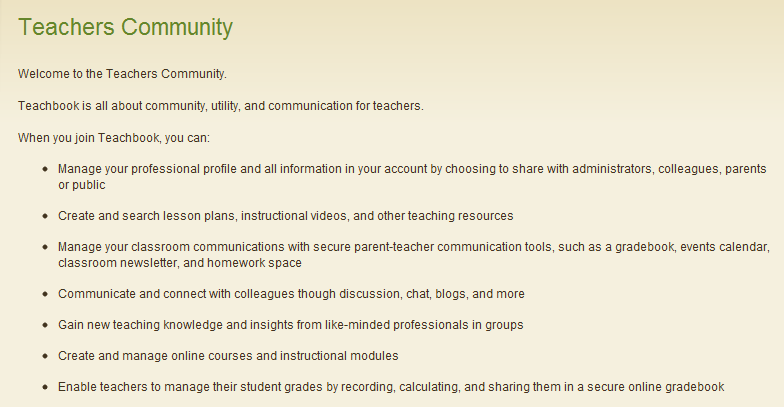
Furthermore, here  is a snapshot of what TeachBook can also offer you


I highly recommend TeachBook to teachers and educators. Head over to its main page and register for a free account.
Read More
Posted in collaborative tools | No comments

Sunday, 16 October 2011

ClassParrot Free Text Messaging between Teachers and Students

Posted on 16:35 by Unknown
ClassParrot is a website for teachers. It allows its users" to send  text messages back and forth between students, parents, and teachers without revealing anybody's phone number". No need need to fret,  your phone number will not be shown to anyone and you are the only person who can have access to it. This technology is highly educational, private, efficient, fast, and reliable.


Statistics have proved that teenagers or at least a huge number of them prefer text messaging to emails. This is generation Next and they depend wholly on mobile technology to do everything in their life. As educators we need to take advantage of this fact and start implementing this technology in our teaching. They will for sure like it and feel more comfortable working with it.

How can teachers use ClassParrot

Teachers can use ClassParrot to do many things such as :


  1. create a quick polling and Q/A platform in and outside the classroom
  2. Remind students of their upcoming exams and quizzes
  3. Send homework updates and events reminders
  4. Interact with parents and brief them about their kids learning and achievement


You might be asking yourself why using ClassParrot when teachers can just go ahead and ask for students' phone numbers and use them directly ? Well this is not a guarranted educational way plus there is no law to cover either you or students when you do so, ClassParrot has even clearly explained this point when it said

" Direct phone-to-phone text messaging presents legal risks for schools. Educators and students exchanging personal contact information create unavoidable liabilities that could potentially cause serious problems in an academic setting. Aside from being unsafe, traditional text messaging becomes cumbersome for educators because it is not intended for mass communication. 
ClassParrot addresses both of these issues. It’s safe: ClassParrot is a closed messaging system where there is never any need to share personal information directly with students. It’s convenient: ClassParrot is optimized for all educators – including teachers, administrators, coaches, program facilitators, mentors and tutors. The system facilitates the enrollment process (for all message recipients) so that educators can effortlessly text one student or an entire class." Taken from ClassParrot

Some features of Classparrot 

Here is a list of some of the best features that ClassParrot offers to its users :

  • It is partly free. It offers 500 messages for free but you can invite your peers and get 200 messages more for each one you invited
  • Teachers can use any computer to send messages and students will get them right in their phones
  • Subscribed students and parents will be able to communicate with the teacher and answer back his messages
  • It enables students and teachers to talk freely and " without giving up their privacy or talking on liability"


How can I get started using ClassParrot ?

It is very easy to use. Teachers need to head over to ClassParrot main page and create their own class. When they are done a unique code and phone number will be generated for them. It is this code that they need to share with students and parents who, in their turn, will have to send a text message to that phone number to sign up for notifications for that class.

If you need to learn more about Classparrot then i I invite you to read their FAQ page.
Read More
Posted in collaborative tools | No comments

Wednesday, 3 August 2011

SideVibe – Simplify the Web and Save Time

Posted on 10:18 by Unknown
SideVibe is a great website for educators. It allows its users to create “ web based online activities, pose questions or even host threaded discussions that can literally float over any Web page.”These activities are stored in the website database so that users can access them anytime they want using the Feedback Tools.


SideVibe is a great site for teachers. They can use it as a source of educational content where students learn in the appropriate context. Contextualization is one of the biggest favors of SideVibe and i think if used properly, it can be a huge incentive for learners to achieve more.

Some features of SideVibe

Here is a list of the main features that SideVibe offers to its users:
  • It has a free basic version with less features than the premium

  • It is easy to use

  • It has an intuitive interface

  • It allows users to create online activities

  • You can create as many vibes as possible

  • You can control who views your vibes

  • Teachers need to sign up for an account and give the entry code to up to 50 students ( free version)

  • You can create as many Courses and Topics  as you like on the Course area of your SideVibe homepage.

  • It lets you printout nice PDF reports


How does Side Vibe work ?

Here are two video tutorials to show you how this tool can be used :
Here is the student companion tutorial
Here are some links to help you learn what Student Companion is all about :
  1. What is the SideVibe Companion?

  2. How do I create a SideVibe?

  3. How do my students access my SideVibes?

  4. Can I create different groups of students?


If you want to learn more about this tool then here are some links to help you do so:
  1. How do I create a SideVibe account for myself?

  2. How do my students create SideVibe accounts?

  3. Is SideVibe secure?

  4. How many SideVibes can I create?

  5. How much does SideVibe cost?

If you want to discover other useful tools that you can use with your students then i invite you to check :
  • Collaborative Web Tools

  • Organizing Web Tools

  • Publishing Web Tools

Read More
Posted in collaborative tools, organizing tools, publishing tools, social networking tools | No comments

Sunday, 24 July 2011

The Best Free Coolaborative Tools

Posted on 13:08 by Unknown
Here is a collection of web applications that collaborative in nature. They can help you create online groups and surveys, share, host, bookmark, and store web pages.  You will find an easy and simple step by step tutorial accompanying each of these applications and in some cases a video illustration is also provided. Feel free to bookmark and share the list with your colleagues and friends.

II : Collaborative Tools
  • Kiwik Surveys : Create and track your surveys
  • Join.me ; share your screen with students
  • toonti; build a powerful social community
  • open study; easily create and join online study gr...
  • Visualize.us : Bookmark,Store, and Share Pictures ...
  • endspace : a free file sharing service
  • ifile.it a free online storage service
  •  Wiggio : The educative way to communicate and work... 
  • Weblist : teachers’ dynamic content sharing site
  • Dushare : unlimited file transfer in education
  •   DisposableWebPage: a great web2.0 tool for educator... 
  •   MultiUrl : combine multiple urls into one short link...
  •   Glosteredu:a collaborative online learning platform for educators...
  • Awesome Highlighter :Highlight and share in education...
  • Cosketch : Teacher’s virtual online whiteboard
  • Bounce : share your educative feedback
  • Sketch : the educative way to communicate with your students... 
  • Embedit.in: a great sharing utility for educators
  • Calaméo : The Educators Way to Master The Web
  • School Rack : Free and Easy Workspace for your classroom...
  • Jottit : a new collaborative space for your students...
Read More
Posted in collaborative tools, educational web tools | No comments

Saturday, 16 July 2011

ChannelME – Browse the web with your friends simultaneously

Posted on 14:35 by Unknown
ChannelME is a great web tool. It allows its users to browse a particular website simultaneously. Isn't this a great idea to be able to look at the same content of a web page with your friends  in real time and even chat with each other using a chat facility for free. Browsing a webpage with your friends simultaneously  can help you bridge that communication gap and  let you enjoy the site collectively by pointing out to its positive and negative aspects.


Some features of  ChannelME

Here is a list of the main features that ChannelME offers to its users:
  • It is free

  • It is simple to use

  • It has a user – friendly interface

  • It lets you browse the web with your friends simultaneously

  • You can even chat with each other while browsing the site

  • you and your friends leave notes on the site

  • You can drag and drop notes


How does ChannelME works ?

As i said before, ChannelME is very easy to use. Just provide it with the URL and it will automatically create a virtual browsing room for you and your friends. You can share the generated URL with your colleagues who, once they open it, they will be asked  to provide a nickname which will allow them to chat with each others while browsing.
Remember links on the web page are clickable

Applications of ChannelME in education

Educators will find ChannelME very useful in the sense that they can use it with their students to browse certain WebPages together. You can provide them with a URL of a page you find interesting for them and try to discover it together using the chat service. I think it is one of the best online collaborative tool for teachers.
If you want to learn more about such tools and how to use them with your students you are invited to visit Educational Collaborative tools .
Read More
Posted in collaborative tools | No comments

Tuesday, 14 June 2011

Doodle- Easy Group Scheduling tool

Posted on 13:00 by Unknown
Doodle is a great web application. It is a tool for scheduling meetings. If you are planning a meeting with different people and you don't want to impose your opinion on them as for the timing of that meeting then use Doodle to make a poll and invite your group members to vote for an appropriate time when they can all meet. It offers a democratic way for scheduling meetings. I like this application and i know we can benefit from it in education and that’s why i am suggesting it to you here.


Some features of Doodle

Here are the main features that Doodle offers to its users
  • It is partly free , there are some features that are premium but the free services are enough for us in education

  • It does not require a sign up but still having an account there is the best way to benefit from its features.

  • It allows you to schedule events and make choices

  • If you are registered you can keep track of all the polls you have made

  • You can connect  your calendar to Doodle and start using its interface to answer meeting requests

  • You can use the”meet me” feature to let your friends and colleagues know when you are available

  • You can share your scheduled events with your contact on Doodle

  • It offers both the mobile Web app and a native App for the iPhone and Android

How can i get started using Doodle ?

You need to log to Doodle main page and sign up for a free account
watch this video tutorial to learn more about how to use it


Applications of Doodle in Education

As i mentioned earlier Doodle can be a very useful tool for us in education. We can use it to schedule meeting time with our colleagues in the same school or anywhere else. School team can also use it to organize their own school related  meetings .
That’s it about Doodle- Easy Group Scheduling tool.

Read More
Posted in collaborative tools, educational mobile apps | No comments
Older Posts Home
Subscribe to: Posts (Atom)

Popular Posts

  • Android Trojan – Learn how to secure your Android
    I have just read an article written by Adrian Kingsley Hughes in ZDNET talking about an Android Trojan. Honestly speaking , i never though...
  • Human Restore:Free educative documentaries
    Human restore is a a great website for educators. It is a repository of free engaging documentaries featuring different categories. This w...
  • iTalk Recorder : A Free Audio Recording Mobile App
    iTalk Recorder is one of the top downloaded app for Ipad and iPhone . iTalk Recorder allows its users to record audio and save it into th...
  • StoryLine Kids' Audio Stories Read Out Loud
    StoryLine is a great website that reads out stories out loud for kids and beginners.It is one of my favourite  story telling websites . It i...
  • Many Books – free educational ebooks
    Many Books is a great resource of free ebooks for teachers. It has indexed more than 29.000 free ebook in a variety of format and for diffe...
  • The best converting and writing tools
    Here is a list of the best converting and writing tools that you can use in your classroom with your students I : Converting Tools : Bee PDF...
  • The best Free teacher resources = collection of great websites
    Here is a list of the best free teacher resources. If you are a teacher or an educator then these URLs are just what you would need to bookm...
  • FreezePage: Freeze pages for later use
    FreezePage is a great web tool. It is a sort of bookmarking tool that is completely different from all the other bookmarking tools we hav...
  • Android Screencast – Control your Android through computer
    Android Screencast is  a cool Android app. It allows its users to control their phones right from their computers. It resembles the other a...
  • What to Expect in Spyware Removal
    When deciding what to buy to how to remove spyware, there are some things you should consider. Those things must make a decision little ...

Categories

  • 21s century education
  • 21st century teaching skills
  • android apps
  • audio conversion tools
  • audio tools
  • avatar creation tools
  • bookmarking tools
  • bp oil spill
  • cartoon making tools
  • Chrome extensions
  • cloud security
  • collaborative tools
  • creative tools
  • documentary websites
  • educational games
  • educational google tools
  • educational mobile apps
  • educational mobile games
  • educational music tools
  • educational search engines
  • educational web tools
  • Electrical network
  • email tips
  • facebook tips
  • file conversion tools
  • file search engines
  • file sharing tools
  • free ebooks
  • free google tools
  • free graphic organizers
  • free mobile apps
  • free presentation tools
  • google mobile apps
  • google search tips
  • google tutorials
  • image conversion tools
  • image editing tools
  • inforgraphic
  • internet safety tools
  • iPad apps
  • iPhone/iPad/iPod apps
  • learn english websites
  • learning tools
  • linear actuators
  • mobile apps
  • mobile audio apps
  • mobile brainstorming apps
  • mobile learning apps
  • mobile note taking apps
  • mobile notetaking apps
  • mobile social networking apps
  • mobile storytelling apps
  • mobile task management apps
  • mobile video apps
  • mobilelearning
  • most popular content
  • music apps
  • music websites
  • notetaking tools
  • organizing tools
  • PDF tools
  • photo tools
  • plagiarism checker
  • PLN
  • publishing tools
  • quiz tools
  • resume tools
  • San Diego data center
  • search tools
  • sharing tools
  • SnowPad
  • social networking tools
  • storage tools
  • teacher resources
  • tutorials
  • Twitter tools
  • VGA over Cat5
  • video resources
  • video tools
  • Vulnerability Management
  • week in review
  • word clouds tools; free graphic organizers
  • writing tools
  • youtube tools

Blog Archive

  • ▼  2012 (199)
    • ▼  June (7)
      • Simple Mathematcal Pattern Describes Shape of Neur...
      • 'Facebook for Animals' Tested On Wild Great Tits
      • Popular Fly Fishing Rods
      • What Does an Electronic Component’s Name Means?
      • What to Expect in Spyware Removal
      • movie poster templates
      • The Benefits of IT Consumerization
    • ►  April (1)
    • ►  March (6)
    • ►  February (83)
    • ►  January (102)
  • ►  2011 (301)
    • ►  December (33)
    • ►  November (21)
    • ►  October (10)
    • ►  September (13)
    • ►  August (41)
    • ►  July (122)
    • ►  June (55)
    • ►  May (6)
Powered by Blogger.

About Me

Unknown
View my complete profile