Lookout Mobile Security

  • Subscribe to our RSS feed.
  • Twitter
  • StumbleUpon
  • Reddit
  • Facebook
  • Digg

Saturday, 2 July 2011

Idea sketch

Posted on 09:01 by Unknown
Idea Sketch is a great mobile app for educators. It allows its users to easily “ draw a diagram , mind map, or flowchart and convert it to a text outline, and vice versa”. We all know the importance of diagrams in learning and the illustrative role it plays in making complicated  things comprehensible. Idea Sketch will help you and your students create diagrams and share them with each other. I really recommend that you give this app a try and see by yourself.


Some features of Idea Sketch

Here is a list of the main features that Idea Sketch offers to its users:
  • It is free

  • It is easy to use

  • It has user-friendly interface

  • It allows you to create diagrams and save them to your Photos App

  • You can copy and paste diagrams and outlines into other apps on your iPhone

  • It lets you upload diagrams top your facebook account

  • It is compatible with iPhone, iPod touch, and iPad. Requires iOS 4.0 or later


Applications of Idea Sketch in education

As i have already said before , Idea Sketch is a useful app for educators . They can use in it different ways and some of these ways are as follow:
  1. brainstorming new ideas,

  2. illustrating concepts,

  3. making lists and outlines,

  4. planning presentations,

  5. creating organizational charts, and more!
If you like this app then you might also like the other Mobile Learning Apps i have covered here so far.
Read More
Posted in educational mobile apps, mobile brainstorming apps | No comments

super search idea generator

Posted on 08:06 by Unknown
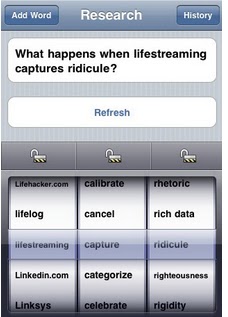
Super Search Idea Generator is a cool mobile app for educators. I really like its design and the concept behind its creation. This app helps you generate interesting ideas to include in your search paper or inside your classroom. It is like a brainstorming tool with a slight difference in that Super Search works in such a smart way that you do not need to exhaust your brain.


Super Search Idea Generator can be used by anyone with an interest in technology. The purpose is to spark your creativity and stimulate your imagination. With this app installed on your mobile device you will have access to tons of ideas that can be productively used for the classroom or even the boardroom.


Some features of Super Search Idea Generator

Here is a list of the main features that Super Search offers to its users:
  • It is free

  • It has an intuitive interface

  • It is easy and simple to use

  • It helps you generate important ideas for your discussion or search paper

  • It offers over 1 billion possible combinations

  • It allows  to lock words in the picker while still refreshing the questions.

  • You can add your own word to any of the three fields in the picker and save those words across sessions

  • It has Hand-crafted” list of words designed to provide unique, stimulating (and sometimes humorous) combinations of questions


Applications of Super Search Idea Generator

Super Search Idea Generator is a mobile app that educators should be aware of and i would really love to see some of you give it a try and see what they can do with it. Here is an excerpt to show you what it can be used for written by Tapku ( the app engineer ):
finding a good answer is hard, but asking a creative question can be even more challenging—and more rewarding. This is why we made Super Research Idea Generator. Designed by a PhD student studying communication and rhetoric and an undergraduate computer science major, Super Research Idea Generator is perfect for jumpstarting your academic imagination. Coming up with a good research question is the key to writing an insightful paper or leading an inspired discussion. Super Research Idea Generator will help you think of interesting questions you can use to begin your research. It’s perfect not just for research papers, but you can use it for presentations or leading discussion in class. It works just as well for teachers as for students.

If you like this app then you might also like the other Mobile Learning Apps i have covered here so far.
Read More
Posted in educational mobile apps, iPhone/iPad/iPod apps, mobile brainstorming apps | No comments

ibooks – Mobile virtual library

Posted on 07:17 by Unknown
iBooks is a great mobile app for educators. It allows its users to  download and read books on the go. No need to go to the bookstores any more you can have the largest library ever and just few clicks away. iBook “includes the iBookstore, where you can download the latest best-selling books or your favorite classics – day or night. Browse your library on a beautiful bookshelf, tap a book to open it, flip through pages with a swipe or a tap, and bookmark or add notes to your favorite passages”.


Some features of iBooks

Here is a list of the main features that iBooks offers to its users :
  • It is free

  • It is easy and simple to use

  • It has an intuitive interface

  • It allows its users to download and read their favorite books from the included iBookstore

  • It lets you browse what you want to read based on title, author;or category

  • You can organize your PDFs and books into personal collections

  • It offers screen adjustment options

  • You can also change the font size to make your books more comfortable to read

  • It has a built-in search feature

  • Keep your bookmarks, notes, and your current page wirelessly in sync between iPhone, iPad, and iPod touch with the new automatic bookmark syncing feature

  • It offers the page navigator at the bottom of every page to quickly find specific pages

  • It has the built-in bookmarking features to let users highlight their favorite passages and add notes to them

  • You can print PDF documents and notes you've written in iBooks using AirPrint

  • It is compatible with iPhone, iPod touch, and iPad and requires iOS 3.2 or later


How can i get started using iBooks in education ?

Here is a short video to show you how you can use iBook app

If you like this app then you might also like the other Mobile Learning Apps i have covered here so far.
Read More
Posted in educational mobile apps, mobile learning apps | No comments

Friday, 1 July 2011

Catch Notes – capture and organize notes on your mobile

Posted on 11:32 by Unknown
Catch Notes is a feature-packed notepad app. It allows its users to '”capture text , voice, images, and locations, all with free sync and backups to Catch.com”. What i really like about this app is the privacy and high security level it offers to its users. All your activity stream is protected by a password. Not only that , you can also access your notes when you are offline and read them.


Some features of Catch Notes

Here is a list of the main features that Catch Notes offers to its users:
  • It is free

  • It is easy and simple to use

  • It has an intuitive interface

  • It lets you capture text, images, and locations

  • It lets you share notes via email

  • It protects your notes with a four digit pincode

  • You can access your notes from anywhere and manage them

  • You can also access your notes even when you are offline

  • It allows you to create and edit notes from you mobile devices

  • You can sync your notes to Catch.com

  • You can organize your content with tags

  • It has easy searching and tagging services

  • It is compatible with iPhone, iPod touch, and iPad and requires iOS 3.1 or later


How can i get started using Catch Notes ?

Here is a short video tutorial to show you how to use this little handy app

If you like this app then you might also like the other Mobile Learning Apps i have covered here so far.
Read More
Posted in educational mobile apps, iPhone/iPad/iPod apps, mobile note taking apps | No comments

Stanza – Great e-reading app for educators

Posted on 10:34 by Unknown
Stanza is a great mobile app for educators. It allows its users to read books on their mobile devices with an awesome interface that offers high clarity and ease of use. It has been featured as one of the top three apple favorites in the “ App Store Turns1” celebration.


With Stanza , you will forget going to the library or bookstore because you will have free access to a catalog of million of books both free and paid . If you are the kind of person who does not like reading on small screen interface then you have the ability to adjust the font size or even the effects and tapping functions of your e-reading app and all for free.

Some features of Stanza

Here is a list of the main features that Stanza offers to its users:
  • It is free

  • It is easy to use

  • It has a user-friendly interface

  • It allows you to download and read e-books on your mobile device

  • It supports several languages such as :Languages: English, Bulgarian, Chinese, Danish, Finnish, French, German, Greek, Hebrew, Hungarian, Italian, Japanese, Korean, Norwegian, Polish, Portuguese, Russian, Spanish, Swedish, Turkish, Vietnamese

  • It is compatible with both iPhone and iPad and requires iOS 3.0 or later.

  • It allows you transfer in e-books you have in your computer with Stanza Desktop application, available for PC and Mac.


How can i get started using Stanza ?

Here is a short video tutorial for you to learn how to use This great mobile app


That’s it about Stanza – Great e-reading app for educators.
Read More
Posted in educational mobile apps, iPhone/iPad/iPod apps, mobile learning apps | No comments

Dropbox – store and share files on your mobile

Posted on 09:42 by Unknown
Dropbox is another great mobile app that every educator should have or at least be aware of. i have already talked about the web version of this tool in an article entitled Dropbox: The Best Way to Share, Sync and back up your Files in which i  talked about how this web application allows its users to store and share files online. Today i am introducing you to the mobile version of dropbox that you can use for free on your mobile devices.


Mobile Dropbox allows it users to view their photos, videos, and documents (.rtf, .txt, .doc, .pdf, etc). What really amazes me about this app is that once you install it on your computer , any file you save to it will be automatically saved to all your computers, iPhone and iPad. You can access your files anywhere you go.

Some features of Dropbox

Here is a list of the main features that Dropbox offers to its users
  • It is free

  • It is easy to use

  • It has an intuitive interface

  • It lets you view your docs, photos, and videos anywhere

  • It lets you add files to “ favorites” for fast , offline viewing

  • You can very easily save photos and videos to your dropbox

  • You can also save email attachments right into your Dropbox.


How can i get started using Dropbox ?

Here is a short video tutorial to show you how to use this mobile app


That’s it about Dropbox – store and share files on your mobile.
Read More
Posted in educational mobile apps, iPhone/iPad/iPod apps, mobile learning apps | No comments

Documents 2: mobile app to download and view docs easily

Posted on 08:19 by Unknown
Documents 2 is a great mobile app for educators. It is in fact a powerful, top value, and must have app for any iPhone. It is the most comprehensible mobile office suite. It allows its users to download and view their documents very easily. It also let them edit and upload them to Gdocs , and  not only that , Documents 2 enable you to work on your downloaded documents offline. What do you think ? isn’t this a great app for you ?


Some features of Documents 2

Here are the main features that Documents 2 offer to its users:
  • It is free
  • It is very simple and easy to use
  • It has an intuitive interface
  • It allows you to download documents,view and edit them
  • It lets you transfer documents to/from your iPhone via FTP or WiFi, Google, or Email
  • It offers an easy to use text editor
  • You can email any document to whomever you want
  • It has an integrated preview option
  • You can upload and download directly to your Google docs account
  • It is compatible with iPhone, iPod touch, and iPad and requires iOS 3.1 or later.
  • It also include “
File Preview:
✚ View any file, PDF Reader
✚ Microsoft Word: .doc, .docx
✚ Microsoft Excel: .xls, .xlsx
✚ Microsoft PowerPoint: .ppt, .pptx
✚ Images: .jpg, .jpeg, .tif, .gif, .svg
✚ iWork: Pages, Number, Keynote
✚ Adobe Acrobat: .pd
✚ Web Pages: .htm, .html
✚ Web Archive: .mht
✚ Audio: .mp3, .wav “


Applications of Documents 2 in education

As i mentioned earlier this app is a must have tool for your mobile device. You can have a direct and instant access to your documents right in your classroom. Teachers can email files to their students on the spot and even encourage them to share documents with each other using the instant emailing service and all for free. Why not give it a try and see by yourself and if you have any further questions do not hesitate to drop them down.
That’s it about Documents 2: mobile app to download and view docs easily.
Read More
Posted in educational mobile apps, iPhone/iPad/iPod apps, mobile learning apps | No comments
Newer Posts Older Posts Home
Subscribe to: Posts (Atom)

Popular Posts

  • Android Trojan – Learn how to secure your Android
    I have just read an article written by Adrian Kingsley Hughes in ZDNET talking about an Android Trojan. Honestly speaking , i never though...
  • Human Restore:Free educative documentaries
    Human restore is a a great website for educators. It is a repository of free engaging documentaries featuring different categories. This w...
  • iTalk Recorder : A Free Audio Recording Mobile App
    iTalk Recorder is one of the top downloaded app for Ipad and iPhone . iTalk Recorder allows its users to record audio and save it into th...
  • StoryLine Kids' Audio Stories Read Out Loud
    StoryLine is a great website that reads out stories out loud for kids and beginners.It is one of my favourite  story telling websites . It i...
  • Many Books – free educational ebooks
    Many Books is a great resource of free ebooks for teachers. It has indexed more than 29.000 free ebook in a variety of format and for diffe...
  • The best converting and writing tools
    Here is a list of the best converting and writing tools that you can use in your classroom with your students I : Converting Tools : Bee PDF...
  • The best Free teacher resources = collection of great websites
    Here is a list of the best free teacher resources. If you are a teacher or an educator then these URLs are just what you would need to bookm...
  • FreezePage: Freeze pages for later use
    FreezePage is a great web tool. It is a sort of bookmarking tool that is completely different from all the other bookmarking tools we hav...
  • Android Screencast – Control your Android through computer
    Android Screencast is  a cool Android app. It allows its users to control their phones right from their computers. It resembles the other a...
  • What to Expect in Spyware Removal
    When deciding what to buy to how to remove spyware, there are some things you should consider. Those things must make a decision little ...

Categories

  • 21s century education
  • 21st century teaching skills
  • android apps
  • audio conversion tools
  • audio tools
  • avatar creation tools
  • bookmarking tools
  • bp oil spill
  • cartoon making tools
  • Chrome extensions
  • cloud security
  • collaborative tools
  • creative tools
  • documentary websites
  • educational games
  • educational google tools
  • educational mobile apps
  • educational mobile games
  • educational music tools
  • educational search engines
  • educational web tools
  • Electrical network
  • email tips
  • facebook tips
  • file conversion tools
  • file search engines
  • file sharing tools
  • free ebooks
  • free google tools
  • free graphic organizers
  • free mobile apps
  • free presentation tools
  • google mobile apps
  • google search tips
  • google tutorials
  • image conversion tools
  • image editing tools
  • inforgraphic
  • internet safety tools
  • iPad apps
  • iPhone/iPad/iPod apps
  • learn english websites
  • learning tools
  • linear actuators
  • mobile apps
  • mobile audio apps
  • mobile brainstorming apps
  • mobile learning apps
  • mobile note taking apps
  • mobile notetaking apps
  • mobile social networking apps
  • mobile storytelling apps
  • mobile task management apps
  • mobile video apps
  • mobilelearning
  • most popular content
  • music apps
  • music websites
  • notetaking tools
  • organizing tools
  • PDF tools
  • photo tools
  • plagiarism checker
  • PLN
  • publishing tools
  • quiz tools
  • resume tools
  • San Diego data center
  • search tools
  • sharing tools
  • SnowPad
  • social networking tools
  • storage tools
  • teacher resources
  • tutorials
  • Twitter tools
  • VGA over Cat5
  • video resources
  • video tools
  • Vulnerability Management
  • week in review
  • word clouds tools; free graphic organizers
  • writing tools
  • youtube tools

Blog Archive

  • ▼  2012 (199)
    • ▼  June (7)
      • Simple Mathematcal Pattern Describes Shape of Neur...
      • 'Facebook for Animals' Tested On Wild Great Tits
      • Popular Fly Fishing Rods
      • What Does an Electronic Component’s Name Means?
      • What to Expect in Spyware Removal
      • movie poster templates
      • The Benefits of IT Consumerization
    • ►  April (1)
    • ►  March (6)
    • ►  February (83)
    • ►  January (102)
  • ►  2011 (301)
    • ►  December (33)
    • ►  November (21)
    • ►  October (10)
    • ►  September (13)
    • ►  August (41)
    • ►  July (122)
    • ►  June (55)
    • ►  May (6)
Powered by Blogger.

About Me

Unknown
View my complete profile